
Let customers see every item as it's rung up.
A secondary, outward-facing screen for Sagitta smartPOS that keeps customers informed and engaged throughout every transaction — and doubles as a digital marketing display.

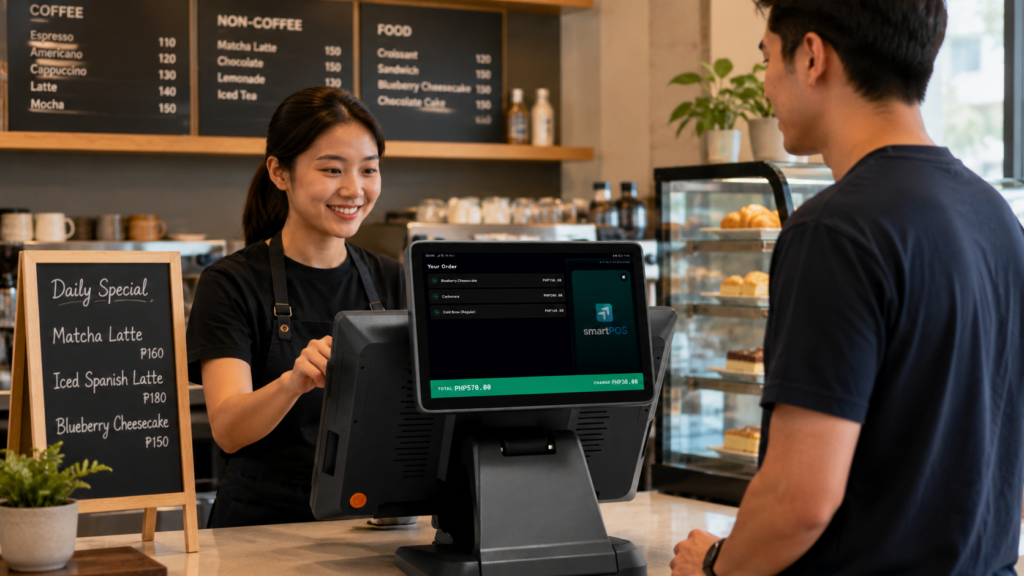
Trust at the till. Sales on the screen.
One screen, two jobs: show customers exactly what they're paying for, and promote what you want them to buy next.
Fewer errors, more trust
As orders are entered, customers follow along in real time — verifying items, quantities, discounts and the total amount before payment is processed. This added transparency minimizes order errors, builds trust and speeds up checkout.
A digital marketing platform
Upload and display promotional images on the customer-facing screen while transactions are in progress. Turn every checkout into an opportunity to increase engagement and drive additional sales.
More than a second screen.
Everything the display does, from order checking to payments, feedback and pickup numbers.
Customers can instantly review every item, quantity and price as orders are entered.
Upload promotional banners, product images and advertisements directly to the display.
Recognizes dual-screen setups so you can route the customer view to the right display. Choose once and the app remembers it.
After payment, customers tap a happy, neutral or sad face — with your own reason tags. It never holds up the sale.
Show the QR Ph payment code on the customer display, with the payment status updating live.
After checkout the display shows the customer's pickup number and a QR to follow their order on their phone.
Show prices in your store's currency — PHP by default, or any symbol you set, with the cart synced in real time.
Three steps to a second screen.
smartCDS runs on its own Android screen or tablet and connects to smartPOS over your store's local network.
Get it from Google Play or download the APK for your Android version below.
Keep both devices on the same WiFi network, then enter the IP address shown on smartCDS in smartPOS under Settings → Customer Display.
Customers follow every order live, and your promotional images play on the screen.
Payment QR and smartQueue need a smartPOS Pro plan. SmileTap is switched on under Settings → Customer Display.
Get smartCDS for free.
Install from Google Play for automatic updates, or download the APK that matches your device's Android version.
Put your counter on display.
smartCDS is free with every smartPOS plan, including the free Starter plan.